Showing posts with label photoshop tutorial. Show all posts

Sunday, April 26, 2009

Photoshop - Simple Puzzle Effect in Adobe Photoshop

This time, I would like to show the photoshop tips to
do some puzzle effect over any photos that you like

Picture 1 : This is an original picture
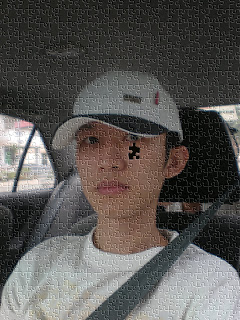
Picture 2 : By using Adobe Photoshop and the functions of
texture and the effect of puzzle will come out.
Simple steps are shown as follows: -
1) This effect can be found in the filter>>texture>>texturizer
2) Select sandstone from the drop down box from the "texture" option.
3) Load texture and find: Adobe Photoshop>>Presents>>Textures>>Puzzle.
After further admendment this is the outcome of the puzzle effect.

Saturday, February 7, 2009

Photoshop 《Winter Image Effects》

Using Adobe Photoshop CS, We can try to change a summer picture to winter scence.
Picture 1 : The above picture is an original photo took at Port Dickson

Picture 2 : Wind effect is added

Picture 3 : This final picture looks icy


Let's use another picture
Picture 4 : The above is a picture took at Penang

Picture 5 : The wind effect is added as well

Picture 6 : Final photo looks like winter scene

Note : Kindly click on this picture 6 and you will see a more clearer effect of it


Related Posts with Thumbnails